What is a virtual desktop pet? The two kinds, a short history, and which run on a Mac

Also in日本語한국어繁體中文简体中文EspañolDeutschPortuguês (Brasil)Français
Quick answer
A virtual desktop pet is a small animated character that lives on top of your apps. Some are pets you look after, like VPet-Simulator with its hunger, thirst and mood meters; others simply live on your screen and react, like Neko, eSheep, Shimeji and Desktop Goose. Here is how the two kinds differ, where they came from, and which ones run on a Mac today.
Download for MacA virtual desktop pet is a small animated character that lives on top of your apps, not inside a game window. There are two kinds: pets you look after, like VPet-Simulator with its hunger, thirst and mood meters, and pets that simply live on your screen and react, like Neko, eSheep, Shimeji and Desktop Goose. We make Shimejiko, a free Mac app of the second kind.
Facts about other apps come from each project's own site, store page or GitHub README, checked on 16 November 2026. VPet's stats come from its source code on GitHub, and the oldest dates from Wikipedia and archived project pages. We haven't tested every app on every Mac.
What is a virtual desktop pet?
A virtual desktop pet is a program that draws a character in a transparent layer above your other windows, so it seems to live on the desktop itself. It walks along the bottom of the screen, sits on window edges and answers your pointer.
The idea is older than the name. Wikipedia's virtual pet article calls Neko, a cat that chases your pointer, the first known virtual pet, and notes that it was called a desktop pet because the term virtual pet didn't exist yet. Today people also say screen mate, desktop buddy or desktop mascot. What is a desktop buddy? sorts them into eight kinds by what they do. Here the split is simpler: does the pet need you, or does it just keep you company?
Pets you look after, and pets that keep you company
The difference is what happens when you forget about the pet for a day.
| Pets you look after | Pets that keep you company | |
|---|---|---|
| What you do | Feed it, play with it, keep its meters up | Watch it, pick it up, throw it, pet it |
| If you ignore it | Its meters run down and it can fall ill | Nothing changes. It carries on |
| Where it comes from | Dogz and Catz on PCs, Tamagotchi in your pocket | Neko, the desktop sheep, Shimeji |
| Examples today | VPet-Simulator | Neko ports, eSheep, Shimeji, Desktop Goose, Desktop Mate |
Pets you look after follow the Tamagotchi idea: you keep someone fed and happy. VPet-Simulator is the best-known desktop example. Its open-source code tracks stamina, satiety (hunger), thirst and mood, plus a hidden health value and a hidden affection value. When satiety or thirst runs out, health drops, and from those numbers the game decides whether your pet is happy, normal, in poor condition or ill. Its Steam page promises "various feeding interactions", and the Steam Workshop adds food, drinks and jobs for the pet.
Pets that keep you company need nothing. They wander, nap, climb and react when you grab them, and a week away changes nothing. Most desktop pets, from Neko onward, are this kind. Some add moments that feel like care, without the chores.
A short history of desktop pets
These are the pets we could date from a source we could check today.
| Year | Pet | Made by | What it did |
|---|---|---|---|
| 1989 | NekoDA, Neko on the Macintosh | Kenji Gotoh, porting Naoshi Watanabe's NEKO.COM for the NEC PC-9801 | A cat that chased the pointer inside its window and scratched at the borders |
| 1995 | Dogz, then Catz in 1996 | PF.Magic | The first widely popular virtual pets, according to Wikipedia |
| 1995 | The desktop sheep, later eSheep | Based on Tatsutoshi Nomura's Stray Sheep shorts for Fuji Television | A sheep that found your windows and the taskbar and walked on them |
| 1996 | Tamagotchi | Bandai | A handheld egg in which you raise a pet through its life stages |
| Early 2000s | Ukagaka | Japanese fans, starting with the host program MATERIA | Characters called ghosts that sit on the desktop and chat with each other |
| By June 2009 | Shimeji 2.0 | Yuki Yamada of Group Finity | Little characters that run around your screen, and the base of today's Shimeji-ee |
| 2020 | Desktop Goose | samperson | A goose that nabs your pointer and tracks mud on your screen, an itch.io pick for February 2020 |
| 2023 | VPet-Simulator on Steam | LB Game | A free, open-source pet with meters to look after, released 13 August 2023 |
| 2025 | Desktop Mate on Steam | infiniteloop | Licensed characters that sit on your windows, play with your pointer and respond to head pats, released 7 January 2025 |
We couldn't find a first release date for Shimeji, only that an archived copy of Group Finity's page was already announcing version 2.0 in June 2009, so that's the date we give. For more on the walking kind, see what a Shimeji is.
Which virtual desktop pets run on a Mac today?
Five run natively on a Mac, and the best-known pet to look after doesn't. Here they are by the job you want done, each with one real drawback. For a longer list with prices, see the best desktop pets for Mac, and for what each one charges, free desktop pets.
- A companion that notices your Mac: Shimejiko. Ours. It runs Shimeji and Shimeji-ee packs natively on macOS 14 or later, Apple silicon or Intel, and the characters react to the charger, the battery and the trackpad (more below). Our catch: the free version shows one character type at a time, up to 3 copies, and after a three-day trial your own imported packs need Pro.
- The classic pointer cat: neko by crgimenes. Its README offers one universal build for Intel and Apple silicon, signed and notarized by Apple. The catch: you change its settings in a configuration script or with command-line flags. Oneko for Mac.
- The 1995 sheep: Desktop Pet for macOS. iappyx's port of desktopPet, the eSheep revival, reads the same pet files as the Windows version and runs on Apple silicon and Intel with macOS 12 or newer. The catch: it isn't notarized, so the first launch is blocked until you click Open Anyway in System Settings → Privacy & Security, and it downloads its pets the first time, so it needs a connection.
- Mischief: Desktop Goose. A name your own price download on itch.io, with a Mac build for macOS 10.10 or later. The catch: the Mac download is v0.22, and the page says Mac doesn't support mods. Shimeji vs Desktop Goose.
- Licensed characters: Desktop Mate. Free on Steam, with a Mac version for macOS 12 or newer, and characters that sit on your windows and respond to head pats. The catch: it needs Apple silicon, Intel Macs aren't supported, and the character DLCs on its page are $14.99 each. Desktop Mate on a Mac.
- A pet to look after: VPet-Simulator. Free and open source. The catch: Steam lists Windows only, so on a Mac it means a Windows setup. VPet on a Mac.
Does Shimejiko need looking after?
No. Shimejiko has no hunger, no stats and nothing you can neglect. The moments that feel like care come from your Mac instead.
- Dinner. Plug in the charger and dinner is served: the characters sit down and eat. Unplug it and they look around, confused.
- Bedtime. When the battery drops below 20%, they yawn and slow down. Below 10%, they fall asleep where they stand.
- Petting. Rest the pointer on a character and stroke the trackpad with two fingers. It purrs, hearts float up, and on a Force Touch trackpad you feel the purr as a rhythm of haptic taps.
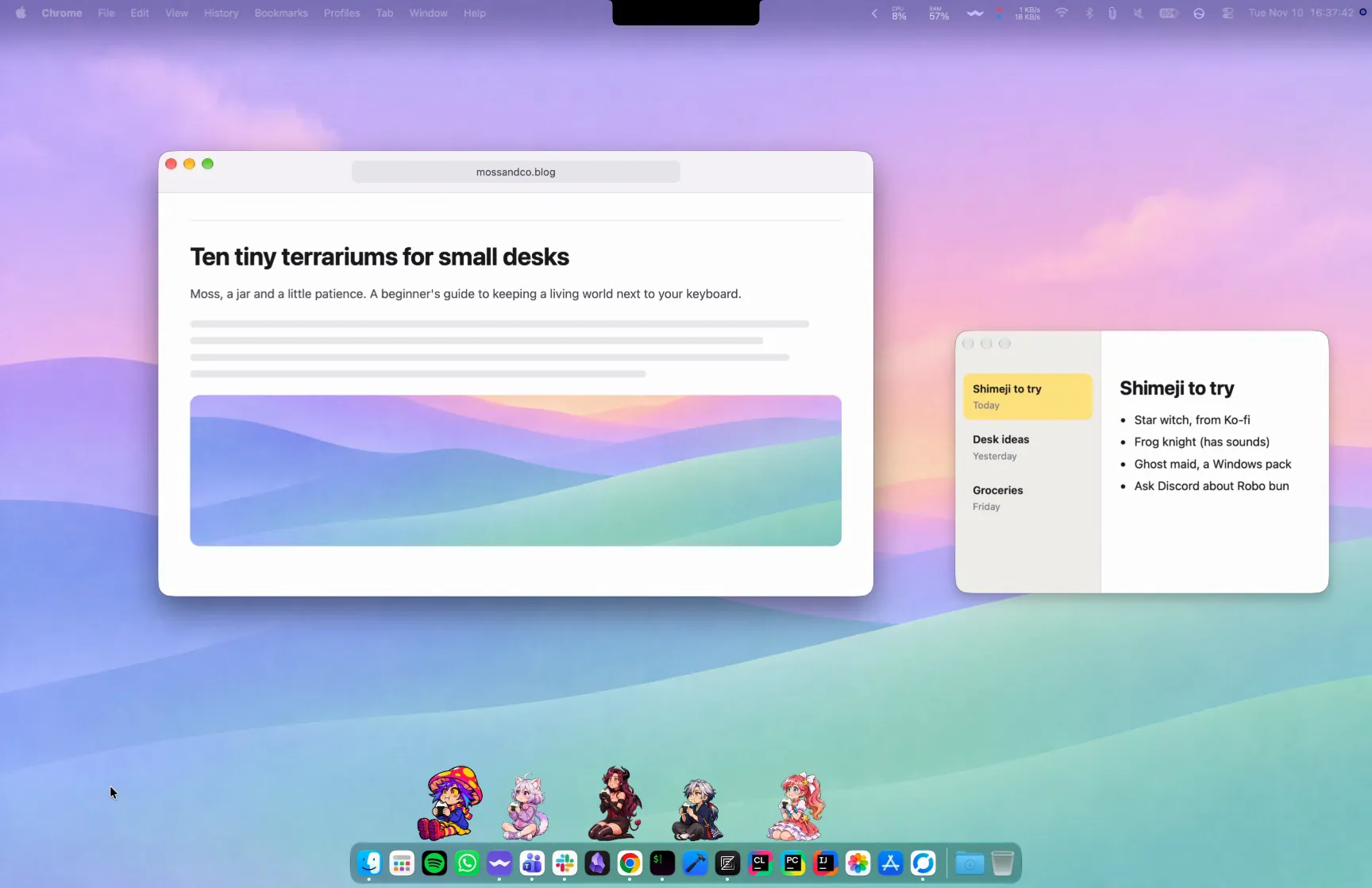

On a recent MacBook, a knock on the case makes the characters jump and tilting the lid makes them slide. Every trick, and which Macs have the sensors for it: a desktop pet that notices your MacBook.
The app is free. Dinner and bedtime work for every character on the free plan, while knock, lid tilt and purr work on Shimejiko herself. Pro is $5.99 once for every character type on screen together and Mac magic for everyone. Original characters in the Shop are $1.99 to $3.99. Free and Pro, compared.
How to choose a virtual desktop pet
Four questions settle it.
- Look after or keep company? If you want meters to fill and a pet that depends on you, that's VPet, on Windows. If you want company with no chores, every Mac option above fits.
- Does it run natively on your Mac? Check the chip and macOS version it asks for, and avoid anything that needs Java, Wine or a Windows virtual machine. Notarized apps open normally; one that isn't needs Open Anyway, so download it only from the project's own page.
- What does it cost after the first day? Free, name your own price, a one-time upgrade and paid characters are four different deals.
- What can it see? A desktop pet doesn't need to read your screen to walk on your windows. Shimejiko reads window positions and sizes only, never captures or reads your screen, never reads what you type, and never uses the camera or microphone.
⌥⌘Hhides everyone before a call.
Questions
Is a virtual desktop pet the same as a desktop pet?
Yes. Virtual desktop pet, desktop pet, screen mate, desktop buddy and desktop mascot all mean a character that lives on your screen. "Virtual pet" on its own can also mean a handheld toy like Tamagotchi.
Is there a virtual pet for Mac that you feed and look after?
VPet-Simulator, the best-known one, is Windows only on Steam. Every Mac option in this article belongs to the keep-company kind. Shimejiko comes closest to care: it eats when you plug in the charger and gets sleepy on a low battery, but nothing goes wrong if you forget it.
Can a desktop pet get sick if you ignore it?
In VPet-Simulator, yes: its code lowers health when satiety or thirst runs out, and low health can make the pet ill. In the keep-company kind, including Shimejiko, nothing happens while you're away.
Are virtual desktop pets free?
Many are. Neko, the eSheep port and VPet-Simulator are free and open source, Desktop Goose lets you name your own price, Desktop Mate is free with paid characters, and Shimejiko is free with a one-time Pro upgrade.
A desktop pet is easier to judge on your own screen. Download Shimejiko free and plug in your charger at dinner time.


