The best desktop pets for Mac in 2026

Also in日本語한국어繁體中文简体中文EspañolDeutschPortuguês (Brasil)Français
Quick answer
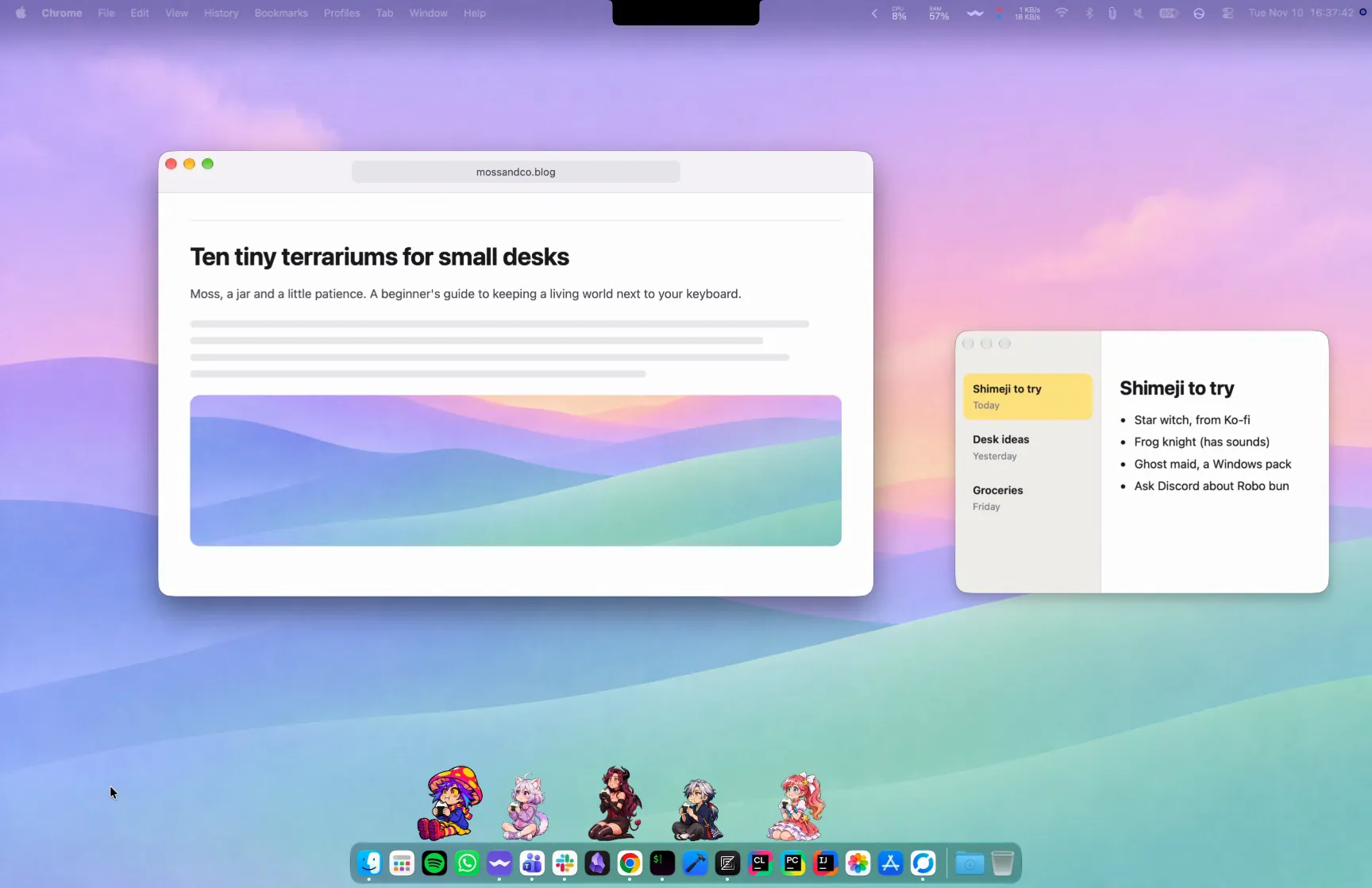
The desktop pets that run on a Mac today are Shimejiko for Shimeji characters that react to your MacBook, Pets Therapy for a large set of pixel animals, Desktop Goose for chaos, Bongo Cat for a cat that types along with you, RunCat Neo and Dockitty for a cat in the menu bar or the Dock, and Desktop Mate for 3D characters. Which one fits depends on whether you want a companion that walks on your windows, a quiet one in a corner, or a game.
Download for MacDesktop pets used to be a Windows thing. On a Mac today you can choose between characters that walk on your windows, cats that live in your menu bar or Dock, a goose that steals your pointer and a whole farm along the bottom of the screen. We make one of these apps, Shimejiko, so we've listed it first and kept every description to facts you can check on each app's own page. Prices and versions are as of November 2026.
The quick comparison
| App | What it is | Price | Runs on |
|---|---|---|---|
| Shimejiko | Shimeji characters on your windows, Dock and notch, reacting to your MacBook | Free, Pro $5.99 once | macOS 14 or later |
| Pets Therapy | More than 75 pixel pets that roam your screen | Free, Lifetime $12.99 or $5.99 a year | macOS 12 or later |
| Desktop Goose | A goose that wanders your desktop and steals your pointer | Pay what you want, $0 allowed | macOS 10.10 or later, Mac build from 2020 |
| Bongo Cat | A cat that taps along as you type | Free on Steam | macOS 11 or later |
| RunCat Neo | A menu bar cat that runs faster as your CPU works harder | Free | macOS 26 or later |
| Dockitty | A cat that is your Dock icon, and can roam | Free, Premium $9.99 | macOS 14.6 or later |
| oneko neko | The classic cat that chases your pointer | Free download | macOS 14 or later |
| Desktop Mate | 3D characters that sit on your windows | Free, paid characters | Apple silicon, Mac version in beta |
| Rusty's Retirement | An idle farm along the bottom of your screen | $6.99 on Steam | Mac and Windows |
| Tiny Pasture | Animals grazing in a strip at the bottom of the screen | $5.99 on Steam | Mac and Windows |
Shimejiko: Shimeji that react to your MacBook
Shimejiko runs Shimeji packs, the fan-made characters Windows users have shared for more than fifteen years, natively on a Mac with no Java. The characters walk on your Dock, climb your windows, sit on the notch and can be grabbed and thrown. On a MacBook they also notice the Mac itself: knock on the case and they jump, tilt the lid and they slide, stroke the trackpad and they purr with a haptic you can feel, plug in the charger and they eat.

Good for: Shimeji fans, anyone who wants characters that move all over the screen, and MacBook owners who want them to react. Price: free with one character type on screen; Pro is $5.99 once for your whole crew. How to get Shimeji on a Mac.
Pets Therapy: a big set of pixel pets
Pets Therapy, on the Mac App Store, has more than 75 pixel pets that wander around your screen. It was called BitTherapy before. Price: free to start, with a Lifetime unlock at $12.99 or a yearly one at $5.99. Needs macOS 12 or later.
Desktop Goose: the troublemaker
Desktop Goose by samperson is the famous goose that wanders your desktop, leaves muddy footprints, drags in memes and notes, and grabs your pointer. The Mac build is version 0.22 from February 2020; mods only work on Windows. It's a pay-what-you-want download on itch.io, where $0 is allowed.
Bongo Cat: the typing cat
Bongo Cat on Steam is a cat that hits its paws on the bottom of your screen every time you press a key, and earns points and hats as you type. It's free to play and runs natively on Macs with macOS 11 or later, Apple silicon or Intel. A separate open-source BongoCat app on GitHub does the same outside Steam.
RunCat Neo and Dockitty: a cat in the menu bar or the Dock
RunCat Neo puts a running cat in your menu bar that runs faster as your Mac works harder, and can show memory or battery too. It's free and open source and needs macOS 26. The original RunCat has left the App Store.
Dockitty makes a cat your Dock icon, and lets it roam if you like. It's free, with a $9.99 Premium upgrade, and needs macOS 14.6.
oneko neko: the classic pointer chaser
The little cat that runs after your pointer and naps when it catches up dates back to early desktop computers. On a Mac, oneko neko on the App Store brings it back (following the pointer starts as a free trial), and the open-source OnekoMac does the same from the menu bar.
Desktop Mate: 3D characters
Desktop Mate puts 3D characters on your windows that react to your pointer and to head pats. The base app is free and characters are paid add-ons. Its Mac version has been in open beta since June 2026 and runs on Apple silicon.
Rusty's Retirement and Tiny Pasture: a farm at the bottom of the screen
Two calm idle games live in a strip along the bottom of your screen while you work. Rusty's Retirement is a little idle farm, $6.99 on Steam. Tiny Pasture has animals grazing in a resizable pasture, $5.99. Both run on Mac and Windows.
What about Shimeji-ee on a Mac?
Shimeji-ee, the edition most Shimeji packs are made for, officially requires Java and runs only on Windows. A community fork bundles Java for Mac, but its last release was in 2022. Shijima-Qt, an open-source engine for Shimeji-ee packs with an Apple silicon Mac build, was discontinued in April 2026. Shimejiko runs the same packs as a native, notarized Mac app.
How to choose
- You want characters all over the screen, climbing your windows: Shimejiko, or Pets Therapy for a ready-made set of animals.
- You want them to react to your MacBook: Shimejiko is the one that reads the knock, the lid and the trackpad.
- You want something quiet in a corner: RunCat Neo or Dockitty.
- You want a game: Bongo Cat, Rusty's Retirement or Tiny Pasture.
- You want chaos: Desktop Goose.
Questions
Are desktop pets safe on a Mac?
Download them from the Mac App Store, Steam or the developer's own page, and check that macOS opens them without asking you to change a security setting. Shimejiko is signed and notarized by Apple and never reads your screen or keystrokes. More on Shimeji and safety.
Do desktop pets slow down a Mac?
A few small characters use very little. Apps that let characters multiply can pile up, so look for a cap or a calm setting. Shimejiko keeps multiplying off by default and caps how many characters can be on screen.
Is there a free desktop pet for Mac?
Yes. Shimejiko, Pets Therapy, Bongo Cat, RunCat Neo and Dockitty are free to download, and Desktop Goose lets you pay $0.
Can I use my own characters?
In Shimejiko, yes: any Shimeji pack works, and you can make your own.