Slap your MacBook: the apps that react, and a gentler knock

Also in日本語한국어繁體中文简体中文EspañolDeutschPortuguês (Brasil)Français
Quick answer
Slap MacBook apps like SlapMac, SlapChan and the open-source spank read the motion sensor inside recent Apple silicon MacBooks and answer a hit on the case with a sound. Here is how they work, which MacBooks have the sensor, how hard is too hard, what else uses it, and how Shimejiko turns a gentle knock into desktop characters that jump.
Download for MacSlap MacBook apps read the motion sensor inside recent Apple silicon MacBooks and react when you hit the case: SlapMac and SlapChan answer from the menu bar, and the open-source spank yells from Terminal. They need a MacBook with that sensor, and a tap beside the trackpad is enough, so never hit hard. We make Shimejiko, a desktop pet app where a gentle knock makes your characters jump instead.
Facts about other apps come from each project's own site or GitHub README, checked on 15 November 2026. We haven't tested every app on every Mac.
How does a MacBook know you slapped it?
Recent Apple silicon MacBooks have a motion sensor, an accelerometer, and apps can read it. Apple doesn't offer it to developers: the open-source reader that spank credits, apple-silicon-accelerometer, describes an accelerometer and gyroscope run by the Mac's sensor processing unit, with no public API, read through a low-level macOS interface called IOKit HID.
A slap app watches those readings for a sudden spike. SlapMac's site says five detection methods vote on every bump, so typing or closing the lid doesn't set it off. A tap already makes a clear spike: spank's default threshold, 0.05 g, is a setting its README calls very sensitive, enough for light taps.
Which MacBooks have the motion sensor?
The motion sensor is in every MacBook from M2 and in the 14 and 16-inch MacBook Pro from M1 Pro and M1 Max.
- Have it: MacBook Air from M2, the 13-inch MacBook Pro with M2, and every 14 and 16-inch MacBook Pro from M1 Pro and M1 Max on.
- Don't have one that apps can read: the M1 MacBook Air, the 13-inch M1 MacBook Pro, the MacBook Neo, Intel MacBooks, and desktop Macs such as the iMac, Mac mini and Mac Studio.
Each app states its own requirement: SlapMac asks for an M1 Pro or later MacBook with macOS 14.6, spank for an M2 or later chip or the M1 Pro, and SlapChan for Apple silicon with macOS 14 Sonoma. If nothing happens, check your model before you hit harder: force doesn't add a sensor. More on what depends on your hardware in Shimeji on Intel and Apple silicon Macs.
Which slap apps can you get?
We could check three slap apps on their own pages today. Each has one real drawback.
| App | Made by | Price | Needs | What it does |
|---|---|---|---|---|
| SlapMac | tonnoz | $12.99 | MacBook with M1 Pro or later, macOS 14.6 | Plays one of 150+ sound clips, louder the harder you slap |
| spank | taigrr, open source (MIT) | Free | M2 or later, or M1 Pro, run with sudo |
Plays a clip from Terminal when it feels a hit |
| SlapChan | SlapChan Labs | $6.99 | Apple silicon, macOS 14 | Shows anime-style overlays, plays voice clips and pulses the trackpad |
SlapMac. A menu bar app by tonnoz: slap the case and it answers with a sound, a whisper for a tap and full volume for a real slap. Its site lists more than 150 clips across nine voice packs, a few cheeky enough that the site suggests headphones, and version 1.6 lets you record or import your own. The catch: at $12.99 it costs the most of the three.
spank. The open-source program SlapMac's site says it was inspired by, written in Go by taigrr. Run it in Terminal and it says "ow" when you slap the case; other modes play Halo death sounds or your own MP3 files, and a cheekier mode escalates the more you slap. The catch: there's no app or window. You start it in Terminal with sudo, and running it at login means writing a launchd file yourself.
SlapChan. A menu bar app that answers a tap with anime-style reaction overlays, voice clips and a haptic pulse on a Force Touch trackpad. It's $6.99 once, and you can import your own sounds and GIFs. The catch: its own install page says macOS shows a security warning on first launch, so you open it with Open Anyway in System Settings → Privacy & Security.
Other slap apps turn up on launch sites, but we couldn't confirm their details from their own pages today, so they aren't listed.
Is it safe to slap your MacBook?
A tap is safe; a hard slap isn't worth the risk, and none of these apps needs one. Apple publishes no rating for how hard a MacBook can be hit, and every app here has a sensitivity setting that picks up a light tap. SlapChan's own page signs off with "Tap gently. Never strike."
- Tap the palm rest or the case beside the trackpad, with your fingertips or one knuckle.
- Leave the screen, the top of the lid and the hinge alone. Screens crack and hinges break.
- Keep the Mac flat on a desk, not on your lap or in your hand.
- If a tap doesn't register, raise the app's sensitivity instead of hitting harder.
What else uses the motion and lid angle sensors?
The same sensors drive a few apps that aren't about slapping.
- Haptyk reads the accelerometer to play mechanical keyboard sounds that follow how hard you type. It's $8 once after a 3-day trial and lists the same MacBooks as above. The catch: the trial asks for your email.
- Lid Angle Sensor by Sam Gold is a free, open-source utility, installed with Homebrew, that shows how far the lid is open and can play a creaking door sound when you move it slowly. The catch: its README says it was tested on one M4 MacBook Pro and lists models where the sensor doesn't show up.
- SlapMac's extras: an Anti-Theft mode that sounds an alarm when someone moves your Mac and disarms with Touch ID, and Lid Effects that tilt and blur the desktop as the lid comes down. Both come with the $12.99 app.
More small delights like these: 12 fun Mac apps.
How is Shimejiko's knock gentler?
In Shimejiko, a knock isn't a sound effect: it's something the characters on your desktop feel. We make Shimejiko, a free native Mac app that runs Shimeji characters on your Dock, your windows and the notch, and it reads three strengths of knock:
- A light tap: the characters look toward it.
- A knock: they jump in surprise.
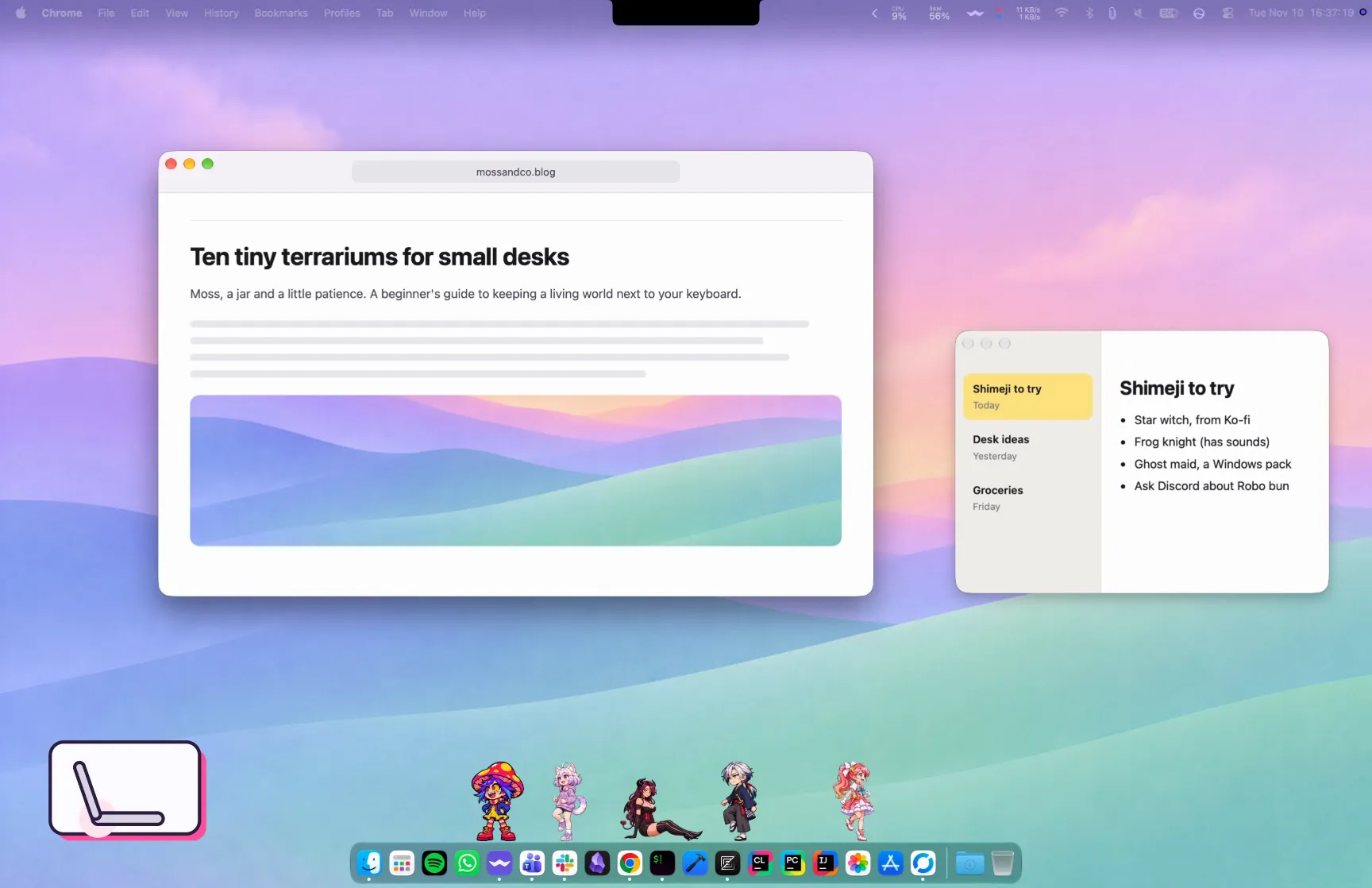
- A hard knock: everyone standing on a window falls off it, down to the Dock.
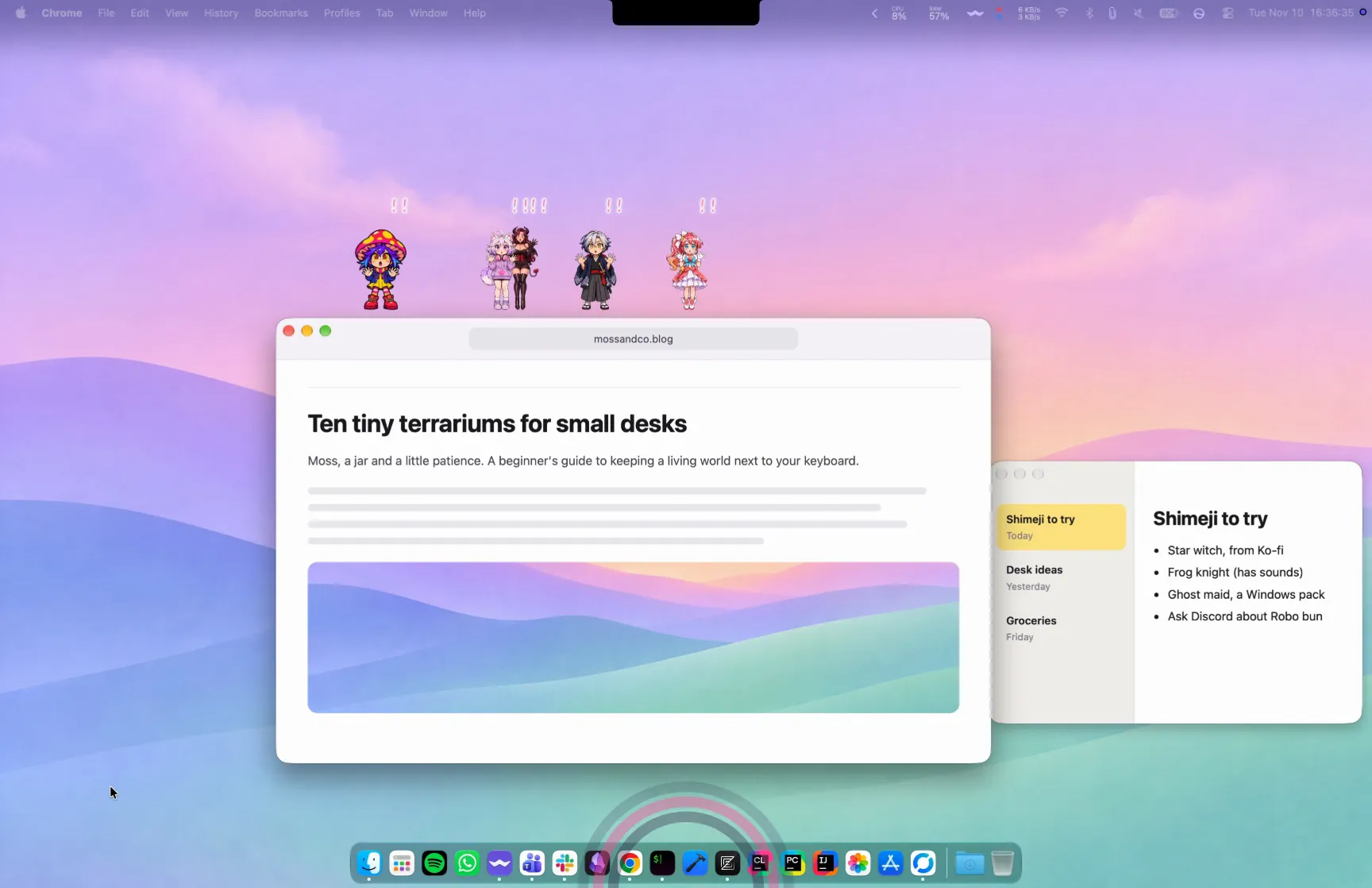
Even the hard knock is a firm knuckle beside the trackpad, not a slap. Shimejiko ignores the small vibrations of typing and clicking, and you set the knock sensitivity in Settings.
The other sensors join in too, and we call all of it Mac magic. Tilt the lid and the characters on the Dock slide; close it most of the way and they wave goodbye and hide. Stroke the trackpad with two fingers over a character and it purrs, with a haptic you feel on a Force Touch trackpad. Every trick, recorded on a real MacBook: a desktop pet that notices your MacBook.
Shimejiko never captures or reads your screen, never reads what you type, and never uses the camera or microphone. The app is free: the free version shows one character type at a time, up to 3 copies, and Mac magic works on Shimejiko herself. Pro is $5.99 once for every type at once and Mac magic for everyone. Our catch: knock needs a recent MacBook's motion sensor, so the base M1 models, the MacBook Neo, Intel and desktop Macs miss out, and in the free version only Shimejiko herself reacts. Free and Pro, compared.
Questions
Can slapping a MacBook damage it?
It can if you hit hard, so don't. A tap beside the trackpad is enough for every app here, and Apple publishes no figure for how much force a MacBook can take. If an app misses your taps, turn up its sensitivity.
Why doesn't a slap app work on my Mac?
Your Mac probably has no motion sensor that apps can read. The M1 MacBook Air, the 13-inch M1 MacBook Pro, the MacBook Neo, Intel Macs and desktop Macs don't, and hitting harder won't change that.
Is Shimejiko like SlapMac?
SlapMac turns the sensor into sounds. Shimejiko is a desktop pet app first: it runs your Shimeji characters, and the sensors make them feel alive.
Does Shimejiko work on a Mac without the sensors?
Yes. On every Mac with macOS 14 or later, the characters walk on the Dock, climb windows, get grabbed and thrown, and hang from the notch or the menu bar. The app's Mac magic page shows which tricks your Mac supports.
A knock is easier to feel than to read about. Download Shimejiko free and give the case a gentle tap.



