The best notch apps for MacBook in 2026

Also in日本語한국어繁體中文简体中文EspañolDeutschPortuguês (Brasil)Français
Quick answer
The best notch app for most MacBook owners is NotchNook. Boring Notch and Atoll are the free, open-source picks, Alcove and DynamicLake are one-time purchases in the Dynamic Island style, MediaMate refreshes the volume and brightness overlays, NotchDrop is a simple file shelf, and TopNotch hides the notch. Shimejiko, which we make, isn't a utility: it's a desktop pet whose characters hang from the notch.
Download for MacThe best notch app for most MacBook owners is NotchNook: it puts music, your calendar and a file tray in the notch, it also works on Macs without one, and every feature is free for 48 hours. If you'd rather not pay, Boring Notch and Atoll are free and open source.
We make Shimejiko, which is a desktop pet and not a notch utility, so we've kept it out of the ranking and given it its own section after the apps. Every other entry is described from its own page, GitHub project or Mac App Store listing, with prices and requirements as of November 2026. The apps are in the order we'd try them, based on features, price and recent updates. We didn't run speed or battery tests.
At a glance
| App | What it is | Price | Needs |
|---|---|---|---|
| NotchNook | Music, calendar, notes and a file tray in the notch | From $15 once or $2 a month, 48-hour trial | macOS 14.6 or later |
| Alcove | Dynamic Island style Live Activities, overlays and Lock Screen widgets | $12.99 once, 72-hour trial | macOS 15 or later |
| Boring Notch | A free, open-source music player, calendar and file shelf | Free | macOS 14 or later |
| Atoll | A free, open-source notch with media, system stats and Lock Screen widgets | Free | macOS 14 or later, a MacBook with a notch |
| DynamicLake | Music, schedule, weather, file drops, notifications and plugins | $13.99 once | macOS 14 or later |
| MediaMate | New volume, brightness and Now Playing overlays | €6.99 once, demo mode | macOS 13 or later |
| NotchDrop | A small file shelf in the notch, with AirDrop | Free | macOS 13 or later |
| TopNotch | Makes the notch disappear | Free | macOS 11 or later |
| Shimejiko (ours) | A desktop pet whose characters hang from the notch, not a utility | Free, Pro $5.99 once | macOS 14 or later |
The notch, in short
What is the notch on a MacBook?
The notch is the cut-out at the top of the screen that holds the camera. Apple calls it the camera housing, and the menu bar runs on either side of it.
Which MacBooks have a notch?
The 14-inch and 16-inch MacBook Pro from 2021 on have a notch, and so does every MacBook Air from the M2 chip on, 13-inch or 15-inch. In Apple's words, that's the MacBook Air with Liquid Retina display and the MacBook Pro with Liquid Retina XDR display. The M1 MacBook Air, the 13-inch MacBook Pro, the MacBook Neo, older MacBooks and desktop Macs don't have one.
What do notch apps do?
They turn the space around the notch into a small panel, usually one that opens when you hover over it. Depending on the app, that panel holds music controls, your calendar, a shelf for files, or new overlays for volume and brightness.
NotchNook: the one we'd try first
NotchNook, from lo-fi cafe, opens the notch into a shelf with music controls, your calendar with join buttons for Meet, Zoom, Teams and Webex, notes, a camera mirror and your Shortcuts, plus a tray that holds files and sends them with AirDrop. Its page says it works with or without a notch, including on external displays.
NotchNook Classic is $15 once or $2 a month. Pro is $19 once or $3 a month and adds a clipboard, song lyrics, Pomodoro and to-dos, a file converter, a teleprompter and a terminal. Every feature is free for 48 hours with no card, and one license covers 2 Macs. It needs macOS 14.6 or later. Pro needs Apple silicon, and Classic also runs on Intel.
Alcove: Dynamic Island for your Mac
Alcove takes its cue from the iPhone's Dynamic Island, and calls itself Dynamic Island for Mac. It has Live Activities, notifications, swipe gestures, Lock Screen widgets and customizable HUDs, the overlays you see when you change the volume or brightness. It's $12.99 once with future updates included, and there's a 72-hour trial. A license covers up to 3 devices, and you can ask for a refund within 14 days. It needs macOS 15 or later, the newest requirement in this list. Its FAQ is upfront that it relies on private APIs Apple could change.
Boring Notch: free and open source
Boring Notch turns the notch into a music player with a visualizer, and adds your calendar and reminders, a camera mirror, a file shelf with AirDrop, and replacements for the system volume and brightness overlays. It's free, open source under the GPL-3.0 license, and has more than 11,000 stars on GitHub. It runs on macOS 14 or later, on Apple silicon or Intel.
Two things to know. Its newest full release is 2.7.3 from November 2025, and release candidates for 2.8 came out in September and October 2026. And the project says it doesn't have an Apple Developer account yet, so macOS warns that the app is from an unidentified developer on first launch. Its README explains what to do, and says installing with Homebrew avoids the warning.
Atoll: free, with system stats
Atoll builds on Boring Notch's code. Alongside media controls it has Live Activities, Lock Screen widgets, and readouts for CPU, GPU, memory, network and disk use, plus timers, clipboard history, a color picker and calendar previews. It's a free download from GitHub, open source under GPL-3.0, and its latest stable release, 2.3.3, came out in July 2026. It needs macOS 14 or later, and its README asks for a MacBook with a notch, naming the 14-inch and 16-inch MacBook Pro.
DynamicLake: a long feature list for one price
DynamicLake, from Aviorrok, is $13.99 once on Gumroad, with lifetime updates, up to 3 devices and a 14-day money-back guarantee. It handles volume and brightness, music, your schedule and the weather, file drops with AirDrop and file conversion, notifications, iPhone calls, an app switcher and plugins, and miniLake is a smaller version for anyone who wants less on screen. It needs macOS 14 or later, on Apple silicon or Intel, and its site says it works on MacBooks with or without a notch and on external displays. To try it first, the free DynamicLake Playground has basic music support and is meant for testing plugins, though its site says it doesn't reflect the full app.
MediaMate: better volume and brightness overlays
MediaMate, by Wouter, replaces the system volume, brightness and keyboard brightness overlays, and adds a Now Playing overlay with play, pause and scrubbing that can show inside the notch or in a separate bubble. There are four themes: iOS-style, circular, notch and classic. It's €6.99 once on Gumroad, one license covers 5 devices, there's a demo mode, and it needs macOS 13 or later.
NotchDrop: a file shelf and nothing else
NotchDrop does one job. Drag a file to the notch and it stays there for a day by default, or open AirDrop from the notch. It's free on the Mac App Store, needs macOS 13 or later, and is open source under the MIT license. The App Store version was last updated in November 2024.
TopNotch: make the notch disappear
TopNotch goes the other way. From MTW, the team behind CleanShot, it makes the notch disappear. It's free, needs macOS 11 or newer, and works with Dynamic Desktop wallpapers, multiple displays and spaces. It can also round the corners of your wallpaper. Its update feed shows version 1.3.2 from June 2023 as the latest, so test it on your version of macOS before you rely on it.
Shimejiko: not a notch utility, but it likes the notch
We make this one, so read it knowing that. Shimejiko has no music controls, calendar or file shelf. It's a desktop pet: little illustrated or 8-bit characters walk along your Dock, climb your windows and, on a MacBook with a notch, jump up and hang from it. On a Mac without a notch they perch on the menu bar instead.
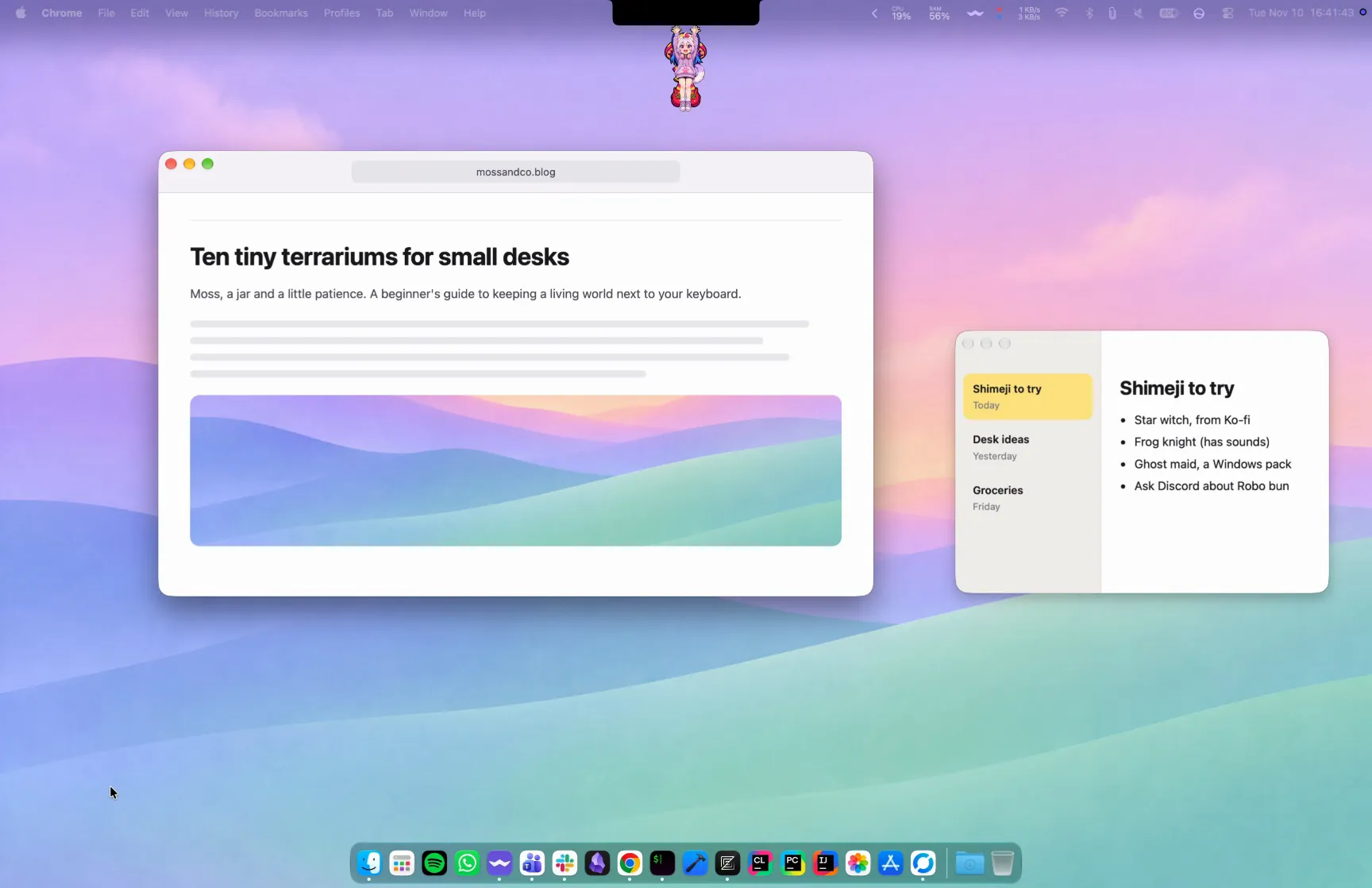
Hanging from the notch is in the free version, and Pro is $5.99 once for your whole crew. It needs macOS 14 or later. If you'd like something alive at the top of your screen rather than another tool, download Shimejiko, or see everything the characters do on a MacBook.
How to choose
- You want one app for music, calendar and files: NotchNook.
- You want to pay once, with no subscription: Alcove, DynamicLake or a NotchNook lifetime license.
- You want it free: Boring Notch, or Atoll on a 14-inch or 16-inch MacBook Pro.
- You have a Mac without a notch: NotchNook, DynamicLake or Alcove.
- You only want better volume and brightness overlays: MediaMate.
- You only want somewhere to drop files: NotchDrop.
- You want the notch gone: TopNotch.
- You want company, not another tool: Shimejiko.
Questions
Do notch apps work on a Mac without a notch?
Several do, and some draw a notch or a pill at the top of the screen instead. NotchNook and DynamicLake say they work without a notch and on external displays. Alcove added a pill shape for notchless displays and an option for a simulated notch. Boring Notch has settings for displays without a notch and a switch to show on all displays. Atoll asks for a MacBook with a notch, and TopNotch only makes sense if you have one. MediaMate and NotchDrop don't say, so try them first: one has a demo mode and the other is free.
Can you hide the notch on a MacBook?
Yes, TopNotch makes it disappear, and it's free. If only one app clashes with the notch, use the setting in the next answer.
What if the notch covers an app's menus?
Turn on Scale to fit below built-in camera for that app. Quit the app, select it in your Applications folder, choose File > Get Info, then select the option. Its menu bar and windows then appear below the camera, and other open apps in the same space move down too until you quit it. If a developer has updated their app for your Mac, the option no longer appears.
Is there a free notch app for Mac?
Yes. Boring Notch, Atoll, NotchDrop and TopNotch are free, and DynamicLake Playground is a free, limited version. NotchNook and Alcove have free trials, and MediaMate has a demo mode.
Are notch apps safe?
They're as safe as where you get them, so download from the developer's own page, the Mac App Store or the project's GitHub page. NotchDrop is on the Mac App Store, and Boring Notch, Atoll and NotchDrop are open source, so anyone can read the code. If macOS warns you about an app, read what its developer says before you go further, and check which permissions each one asks for.
Does Shimejiko replace a notch app?
No. Shimejiko puts characters on your screen, not tools, so pick a notch app if you want music controls or a file shelf. For more like it, see 12 fun Mac apps, the best desktop pets for Mac and ways to customize your MacBook.



