How to get Shimeji on a Mac (no Java needed)

Also in日本語한국어繁體中文简体中文EspañolDeutschPortuguês (Brasil)Français
Quick answer
Download Shimejiko from shimejiko.app, open it, and drop any Shimeji zip on its window. It is a native Mac app for macOS 14 or later, so there is no Java to install, no Terminal and no security setting to switch off. Packs made for Shimeji-ee on Windows, the original Shimeji and the Android app all run, and the free version shows one character type at a time.
Download for MacShimeji are little characters that walk along your screen, climb your windows and sit on top of whatever you are working on. Almost every Shimeji you find online comes with the same note: Windows only. If you have a Mac, this guide gets one on your screen in about two minutes, with the packs you already have.
Why Shimeji is hard on a Mac
Shimeji-ee, the edition most packs are made for, is a Windows program written in Java. On a Mac, the old guides ask you to install Java, run a .jar file from Terminal and approve it in your security settings. That can work, but it is fiddly, it tends to break when macOS updates, and a Java window has no idea where your Dock or your MacBook's notch is.
Shimejiko takes a different route. It is a native Mac app that reads Shimeji packs as they are: the same images and the same settings files that Shimeji-ee uses. Nothing to convert, and the zip you downloaded for Windows is the zip you use.

What you need
- A Mac with macOS 14 Sonoma or later. Apple silicon and Intel both work.
- A Shimeji pack, if you have one in mind. A zip, rar or 7z file is fine, and so is a folder. If you don't have one yet, Shimejiko herself and her 8-bit twin come with the app.
- About two minutes.
You don't need Java, Terminal, Homebrew or an account.
How to install Shimeji on a Mac, step by step
- Download Shimejiko. Go to shimejiko.app and press Download for Mac. The app is signed and notarized by Apple, so it opens like any other Mac app.
- Move it to Applications. Open the downloaded file and drag Shimejiko into your Applications folder, then open it from there.
- Say hi. Shimejiko walks out and shows you around in about a minute. You can skip the tour at any point.
- Drop in your pack. Drag your Shimeji zip onto the drop zone in the Shimejiko window, or choose Import a Shimeji Pack from the menu. Windows and Android packs work too. If a zip has a password, Shimejiko asks you for it.
- Put your friend on screen. Your character appears in the Library. Click it and it walks out onto your desktop, right on top of your windows and the Dock.
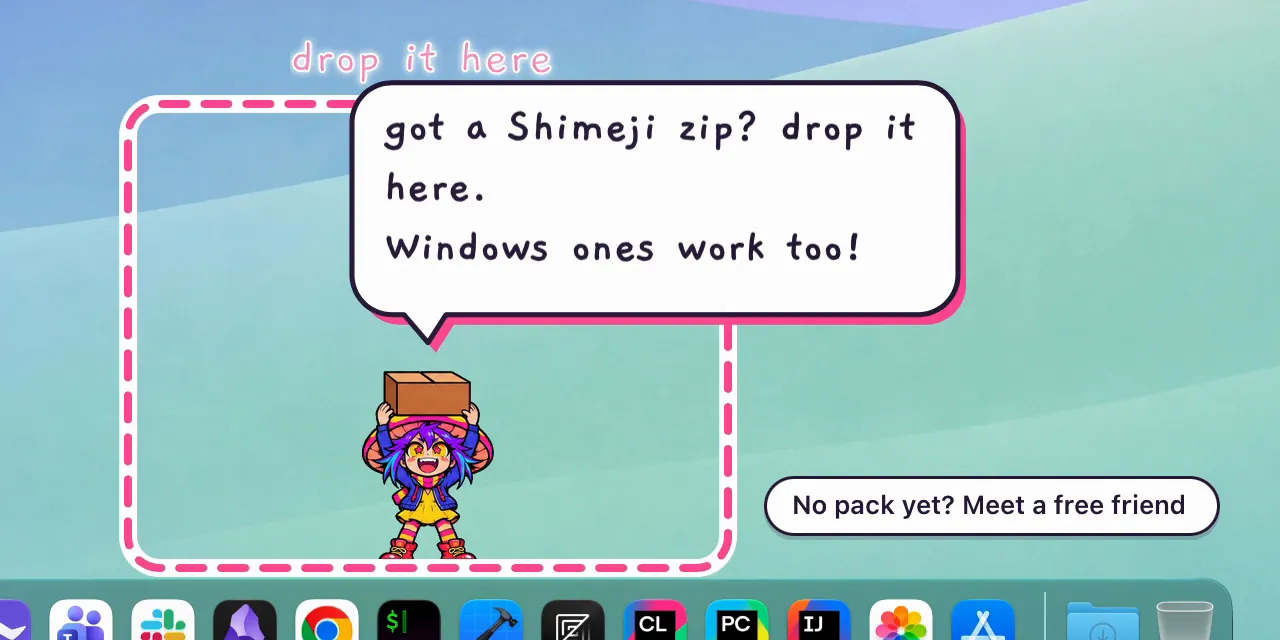
That's it. If you want your characters to climb along your windows and throw them around, Shimejiko asks for the Accessibility permission. It is optional: everything else works without it, and the app never asks to record your screen or use your camera or microphone.
Where to find Shimeji packs
Shimeji fans have drawn thousands of characters over the years. The places most packs come from:
- shimeji.org, a large directory of packs. We tried all 2,304 packs on it in Shimejiko, and every one runs.
- DeviantArt, where the classic Shimeji-ee packs live.
- GameBanana and itch.io, often as rar or 7z files. Those work as they are.
- Packs for the Android Shimeji app, which use the same format.
Download the pack the way the artist shares it and drop the file on Shimejiko without unpacking it. If one image or settings file in a pack is broken, Shimejiko tells you which file and which line, and the rest of the pack keeps running.
Most packs are fan art made for fun, so please respect what each artist asks: credit them, and don't sell or reupload their work. If you'd like characters drawn for the Mac, the Shop has original ones, illustrated and 8-bit, by artists who get 70% of each sale.
What your Shimeji can do on a Mac
Everything a Shimeji does on Windows, plus a few things only a Mac can offer:
- Walk along the bottom of the screen and the Dock, climb the sides of windows and hang from the top of the screen.
- Ride along when you drag a window, and get thrown across the screen when you grab them with the pointer.
- Sit on the notch of a MacBook, or on the menu bar of a Mac without one.
- Stay on top of everything, full-screen apps included, while clicks pass through to the app underneath. Only their own pixels can be grabbed.
- React to your MacBook itself: knock on the case and they jump, tilt the lid and they slide, stroke the trackpad and they purr. We wrote a whole guide to these Mac magic tricks.
Multiplying, the old Shimeji habit of making copies of itself, is there too as an option. It is off by default, so your desktop stays the way you set it up.
Free or Pro
Shimejiko is free to download and keeps working for free. Pro is a single payment, not a subscription.
| What you get | Free | Pro ($5.99 once) |
|---|---|---|
| Import Shimeji packs | As many as you like | As many as you like |
| On screen at once | One character type, up to 3 copies | Your whole crew, up to 30 |
| Mac magic (knock, lid, purr) | Shimejiko herself | Every character, imported ones included |
| Notch, dinner time and sleepy | Yes | Yes |
Pro also lets characters roam across all your displays, adds settings per character, and works on up to 3 Macs.
If something doesn't work
The pack says Windows only. Drop it in anyway. The Windows note is about Shimeji-ee, the program, not the character.
The download is an .exe. Some Windows packs come as files that unpack themselves. Drop the .exe on Shimejiko and it reads the pack inside without running anything.
They get in the way. Press ⌥⌘H to hide everyone at once, and again to bring them back. Calm mode makes them quieter, and Shimejiko can hide them automatically while you present in Keynote or PowerPoint or watch a video full screen.
A character does something odd. Open the pack in the Library and run its test bench. It plays every move frame by frame and shows any error in the pack's files with its line number.
Questions
Do I need Java to run Shimeji on a Mac?
No. Shimejiko is a native Mac app with its own engine, written from scratch for macOS. There is no Java to install and no .jar file to run.
Will my Shimeji-ee packs work?
Almost certainly. Shimejiko reads packs made for Shimeji-ee, the original Shimeji and the Android Shimeji app, with English or Japanese settings files, along with their scripts and sounds.
Does it work on Intel Macs and on a Mac mini or iMac?
Yes. Any Mac with macOS 14 or later runs every pack. The Mac magic tricks depend on the sensors in your Mac, so a desktop Mac has no knock or lid tricks, but the characters walk and climb the same way.
Is Shimejiko on the Mac App Store?
Not yet. App Store apps run in a sandbox that would take away knock and throwing windows, so it is sold directly from shimejiko.app as a download notarized by Apple.
Is it safe?
Shimejiko is signed and notarized by Apple. It never captures or reads your screen, never reads your keystrokes and never uses the camera or microphone. The packs you import stay on your Mac.

